
AI Director · Preview
An AI director that plans
before it renders.
Describe your story. The fox director is designed to propose scenes, a cast and a visual style, then wait for your approval before anything is generated.
Preview. AI generation is not connected yet. Everything described here is how LanternCut is designed to work; screenshots show the interface preview with sample data.
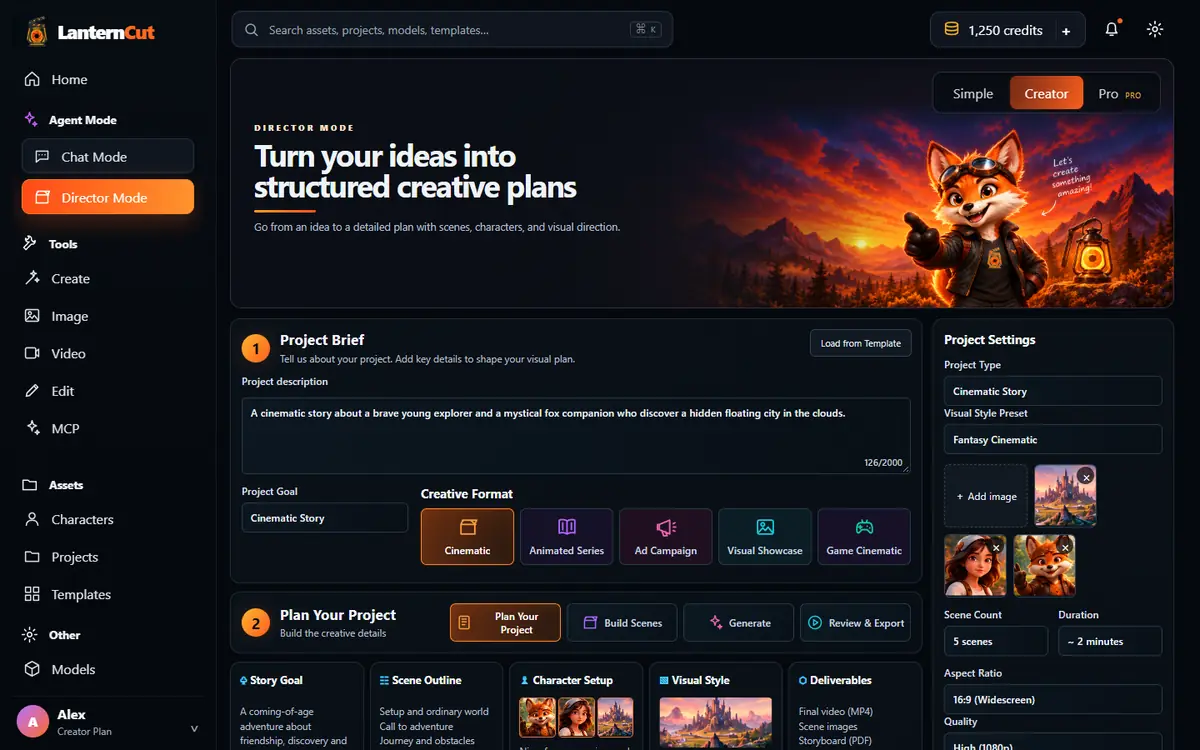
What it is designed to do
AI Director in LanternCut
Brief to plan
Write what you want to make. The director drafts a project brief, a scene list, a cast and a look.
You stay in charge
Every scene is editable: reorder, rewrite, add or remove scenes before rendering.
Draft then final
Drafts are planned for LanternCut Open models; you upgrade only approved scenes to premium models.
Cost before you click
The planned cost of each scene is shown before it renders, and failed renders are refunded automatically.
Choose your starting point
Script, idea, image or video.
Every production starts somewhere different. The director is designed to take any of these and turn it into a scene plan.
Script
Paste a script or outline. The director splits it into scenes and shots.
Idea
One sentence is enough. The director drafts a story, a cast and a look.
Image
Start from a picture: a character, a location or a mood board.
Video
Start from a clip you own and plan what happens next.
Production types the director is designed for
Short film
A self-contained story in a handful of scenes.
Template plannedMusic video
Scenes timed to a song you have the rights to.
Template plannedProduct & UGC-style ad
Ad variants with the same product or mascot.
Template plannedKids' story episode
A gentle story with a recurring cast.
Template plannedStoryboard & pitch
Shot list and frames to present an idea.
Template plannedExplainer
A lesson or product explained as a short story.
Template plannedHow it works
Four steps.
The director's planning uses a language model; scene renders use the image and video models in the catalogue.
Describe the project
Pick a goal such as a cinematic story, an ad or a series episode, and write a brief.
Review the plan
The director proposes scenes, characters and style. Edit anything.
Draft every scene
Low-cost drafts show the whole story early.
Finalise and export
Upgrade approved scenes and assemble the result.
Simple · Creator · Pro
Same tool, three levels.
Switch level inside the workspace. Levels are interface depth, not prices.
| Simple | Creator | Pro |
|---|---|---|
| Guided project setup with a few clear questions | Project board, scene builder and character setup | Workflow, context and automation settings |
Questions
Questions about AI Director
Does the director work today?
The Director Mode interface is in the preview with a sample plan you can edit. The AI planning service is not connected yet.
Why plan first?
Planning first means you see the whole story before you spend credits on final renders. It is LanternCut's answer to wasted generations.
Try LanternCut with a demo account.
When generation goes live, the demo account gives you 1 image and 1 five-second video on LanternCut Open models. Until then, explore the interface preview.