
Video · Preview
Video shots that follow the plan.
Video Studio is designed for text-to-video and image-to-video shots with start and end frames, camera motion, duration and audio, ready to slot into a directed scene.
Preview. AI generation is not connected yet. Everything described here is how LanternCut is designed to work; screenshots show the interface preview with sample data.
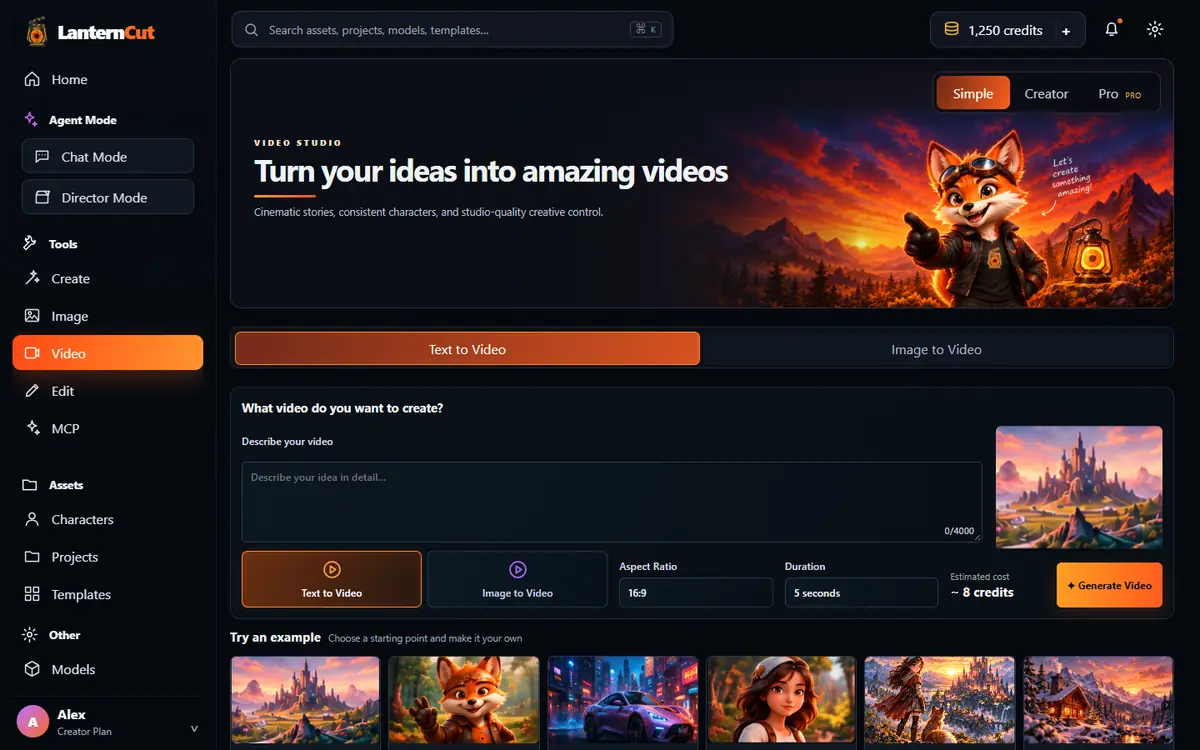
What it is designed to do
Video in LanternCut
Text or image to video
Start from a description, or animate a still image from your project.
Frames and motion
Set start and end frames, camera moves and duration.
Same cast, every shot
Use characters from your cast as references for each shot.
Draft, then final
Draft shots on open models, then re-render approved shots on a premium model.
How it works
Four steps.
Planned video models include LanternCut Open models from the Wan 2.2 and LTX-2 families, and premium models through vendor APIs. See the video catalogue.
Set up the shot
Choose text-to-video or image-to-video.
Direct the camera
Pick framing, motion and length.
Draft
Preview the shot cheaply.
Finalise
Upgrade the approved shot and add sound.
Simple · Creator · Pro
Same tool, three levels.
Switch level inside the workspace. Levels are interface depth, not prices.
| Simple | Creator | Pro |
|---|---|---|
| Text or image, aspect ratio and duration | Frames, camera motion and references | Advanced motion, lip sync and batch tools |
Questions
Questions about Video
How long can a clip be?
Clip length will depend on the model. The demo account is planned to include one five-second video.
Can I generate video now?
Not yet. The Video Studio interface is in the preview; generation is not connected.
Try LanternCut with a demo account.
When generation goes live, the demo account gives you 1 image and 1 five-second video on LanternCut Open models. Until then, explore the interface preview.